


Cricket Visual Voicemail
3.910.93K Reviews
App Specs
- Version
- 3.19.0.101277
- Updated On
- License
- Free
- Downloads
- 10,000,000+
- Developer
- Cricket Wireless LLC
- Categories
- Communication
- Platform
- Android
Screenshots


 Analysis by AppCompare
I tend to notice voicemail only when it becomes a problem: a missed call from a school, a delivery driver who could not reach me, or a family member leaving a message that I need to hear quickly. Cricket Visual Voicemail makes that part of phone communication easier to manage by putting voicemail messages into a visual list instead of forcing me to call a mailbox and listen from the beginning every time. It is a free communication app from Cricket Wireless LLC, and its usefulness is closely tied to how a Cricket phone line handles voicemail.
After using it, my main impression is that it is a practical utility rather than an app I would open for entertainment or social interaction. I can see which messages are waiting, choose the one I want, play messages in a more convenient order, and respond with a call or text when that makes sense. That sounds simple, but the difference matters in a busy household where several people may share a phone, pass a device between them, or need to decide quickly whether a missed call requires action.
The important point is control over attention: I do not have to work through every voicemail just to reach the newest one. For people who receive appointment calls, school updates, work messages, or family requests, that small change can save time and reduce the chance of overlooking something important.
How it fits into a shared household
A realistic example is a household phone used by a parent who is coordinating several daily tasks. During the morning, there may be a voicemail from a clinic, another from a delivery service, and an older message from a relative. With a traditional voicemail system, I might have to listen in sequence, remember which messages matter, and wait through greetings or repeated instructions. The visual list gives me a clearer starting point: I can select the message that seems relevant and deal with it first.
This is especially helpful when the phone is used around other people. A parent may want to check a message while a child is nearby, or a partner may need to understand which call came in without taking over the entire mailbox. The app does not turn voicemail into a shared family workspace, and I would not treat it as one. Its value is that the person holding the phone can review messages in a more orderly way.
That distinction matters for shared devices. If several people use the same handset, the voicemail list should be treated as belonging to the phone line, not as a private account for each household member. I would avoid assuming that the app separates messages by person or creates individual profiles. Anyone with access to the device may potentially see that messages exist and may be able to play them, so the household needs a clear agreement about who checks voicemail and when.
For a single-user phone, this arrangement is straightforward. For a shared phone, I would establish a simple routine: one person checks new messages, identifies which ones need a response, and tells the relevant household member rather than leaving the app open. That is not a special feature of the application; it is a sensible way to prevent accidental disclosure of personal conversations.
Worth Reading Before You Choose

EA SPORTS FC Mobile 26 Is a Bigger Football Game, but It Takes Time

Flipboard Shows What News Apps Must Do Beyond the Feed

Switching to Android Auto Means Rethinking Your Driving Routine

Google Calendar Makes a Crowded Week Easier to Manage

Ludo King Makes the Most of the Minutes Between Plans

Baby Panda World Brings Quick Play to Modern Phones, but Its Game Library Feels Busy
The app is also useful when coordination happens under pressure. Suppose a family member leaves a message saying they will arrive later, while another caller needs an immediate callback. Being able to choose the message directly makes it easier to separate urgent communication from background information. I found that this is more useful than the basic idea of “seeing voicemail,” because the visual order supports quick decisions.
What the visual workflow changes
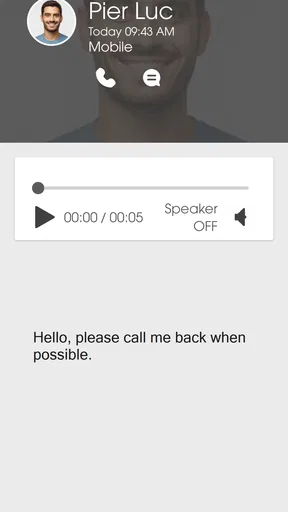
Calling a voicemail box is often designed around a sequence: enter the mailbox, listen to the newest or oldest message, press options, and repeat. That process can be perfectly adequate when there are only one or two messages. It becomes tiring when messages accumulate or when I already know which caller I need to hear. Cricket Visual Voicemail offers a more direct approach by presenting messages as items I can choose individually.
The ability to reply by call or text is another practical detail. If a message asks for a quick confirmation, texting may be enough. If the subject is sensitive, complicated, or urgent, calling back is more natural. I like having those response choices close to the message instead of switching between a voicemail system and the phone app while trying to remember the caller’s details.
One useful habit is to listen with a purpose. I can open the message from the person I am expecting, note the requested action, and respond immediately. For household coordination, that can mean calling a partner back, texting a teenager that a pickup time changed, or returning a missed call from a service provider without sorting through unrelated messages first.
There is a trade-off, though. A visual list can make voicemail feel easier without removing the need for organization. If I leave every message untouched, the list can still become cluttered. I would use the app as a triage tool, not as a permanent archive that I never review. Once a message is no longer useful, dealing with it through the available voicemail controls keeps the list manageable.
Setting boundaries before other people use the phone
Setup is most comfortable when the phone is primarily used by one person. Because this is a Cricket service app, I would begin with the Cricket line that will receive the voicemail and make sure the phone meets the operating-system requirement. The current version is 3.19.0.101277, and the app requires at least OS 10. That requirement is worth checking before planning to use it on an older device, particularly if a household keeps a spare phone for occasional use.
I would also decide who needs access before installing it on a shared handset. The app is free, which removes one barrier for a family deciding whether to try it, but free does not mean that every phone in the home should automatically have access to the same voicemail. The right arrangement depends on whose number the device represents and who is expected to handle incoming calls.
For a child using a parent’s phone occasionally, I would explain that voicemail may contain adult conversations, appointment details, or information meant for another person. The app has an Everyone content rating, but that does not make every message suitable for every listener. The rating describes the application’s general content context, not the private content that callers may leave in a mailbox.
That is one of the most important boundaries in a household setting: the age rating does not replace judgment about the messages themselves. A family can let a child use the phone for calls while still making voicemail review an adult responsibility. I would not present the app as a parental-control tool, because it is not designed to divide access by age or create separate household permissions.
Another boundary concerns notifications and attention. If the phone belongs to someone who is often driving, working, or caring for a child, a new voicemail may be useful information but not an instruction to respond immediately. I prefer to check messages when I can listen carefully and decide whether a call or text is appropriate. The app helps me choose the message; it does not decide its urgency for me.
Coordinating calls without turning voicemail into a group chat
Cricket Visual Voicemail works best when I think of it as a communication checkpoint. It tells me what has arrived and lets me choose how to continue the conversation. That is different from a messaging app, where several people can participate in one visible thread. Here, the voicemail remains a message from a caller to the phone line, and the response happens separately through a call or text.
That separation can be a strength. A voicemail from a school office may contain details that should be heard by one parent, while a text can quickly tell the other parent that the call was handled. A message from a repair company may be easier to answer by phone, while a simple “I received your message” can be sent by text. I like being able to make that choice at the moment rather than following one fixed communication method.
For couples or housemates sharing responsibility, I would use a verbal or written household routine alongside the app. For example, the person who checks the voicemail can say who called and what action is needed, without handing the phone around unnecessarily. This reduces the risk of someone replaying a private message simply because they were trying to find out whether it was important.
The app is less suitable when the household needs a complete record of shared tasks. It does not replace a family calendar, a group chat, or a notes system. If several people must track appointments, pickup duties, or service instructions, I would move the relevant information into the household’s usual coordination tool after listening. The voicemail app is the intake point, not the long-term planning system.
I also would not rely on it as the only way to preserve critical information. If a caller gives a complicated address, a long reference number, or instructions that several people need, I would write the details down or ask for them by text. Listening again is convenient, but a visual voicemail list does not automatically transform spoken information into a searchable written record.
Privacy, trust, and different ages
Trust is more important than technical convenience when a phone is shared. The app can make messages easier to reach, which is helpful for the intended user but also means that voicemail may be more visible to anyone who can unlock or handle the device. I would not install it on a communal phone without discussing that expectation first.
For an older relative, the visual list may be easier than remembering voicemail keypad commands, especially when the goal is simply to select a particular caller. However, the person still needs to know what each response option does before tapping it. Calling back and texting are different commitments, and a quick explanation can prevent an accidental response.
For a younger user, I would focus on message ownership. A child may be allowed to answer calls or listen to a message from a known relative, but that does not mean they should open every voicemail. The app’s Everyone rating makes it broadly suitable as software, yet the real-world content depends on who calls the number. I see this as a household conversation about privacy rather than an app setting.
This is also where the app’s connection to Cricket matters. If a family is comparing it with a carrier-neutral voicemail tool or a full messaging platform, the question is not only which interface looks better. The question is whether the household uses a Cricket line and wants a voicemail experience connected to that service. For a Cricket customer, the focused design is sensible. For someone who changes carriers frequently or wants one voicemail system across different networks, a broader alternative may be more convenient.
The same comparison applies to people who already use a phone’s built-in visual voicemail. If that system gives you a clear message list and reliable playback, adding another voicemail interface may not improve your routine. Cricket Visual Voicemail makes more sense when it provides the visual access you want on a compatible Cricket phone and the standard mailbox experience feels too slow or awkward.
Where it is strong, and where I would choose something else
My favorite part is the ability to choose the message I want instead of treating voicemail as one uninterrupted queue. That is the difference between a feature I occasionally tolerate and one I can see using regularly. The call-or-text response options also fit real situations, because not every voicemail deserves the same kind of reply.
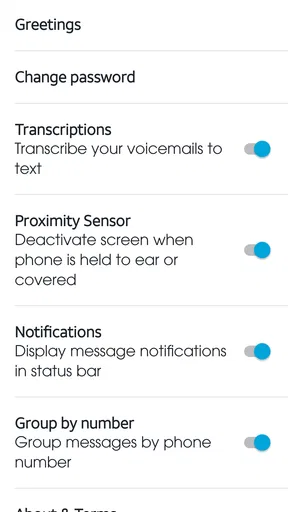
The app has a focused purpose, which is both its advantage and its limitation. It does not try to be a complete communications hub. I would not choose it if my main need were group conversations, shared task management, automatic transcription, or a unified inbox for several services. In those cases, the usual messaging apps or a phone’s broader communication tools may be a better match.
I would also be cautious if the household expects separate identities on one device. The app should not be treated as a multi-user family mailbox with independent privacy boundaries. A shared handset still creates shared access, and the safest approach is to keep the device with its intended owner or agree clearly about voicemail handling.
Its scale suggests that it has broad practical appeal: the app has passed ten million installs, carries a 3.9 average from roughly thirty-three thousand ratings, and has more than ten thousand written reviews. Those figures do not tell me whether it will fit a particular phone or household, but they do show that this is an established Cricket communication utility rather than an obscure experiment. I would still judge it by the daily voicemail workflow, not by popularity alone.
The application has been available since December 11, 2012, and the current release is 3.19.0.101277. I mention that because long-running carrier utilities often serve a very specific need: they may not offer the broadest feature set, but they can be worthwhile when they match the phone line and the user’s habits. In my experience, that is the right way to evaluate this one.
My household verdict
Cricket Visual Voicemail is a good fit when the problem is ordinary voicemail friction. If you use a compatible Cricket phone, receive messages from work, relatives, schools, clinics, or services, and want to choose which message to hear first, it offers a more manageable routine than calling into a mailbox every time. It is free, rated Everyone, and its communication-focused design is easy to understand.
I would recommend it to a single phone owner who wants faster voicemail triage, and to a household that can agree on sensible boundaries around a shared device. The most valuable workflow is simple: check the visual list, listen to the message that matters, decide whether a call or text is appropriate, and move the important details into the household’s normal planning system.
I would skip it if you need a shared family inbox, strong separation between users, or a full messaging and coordination platform. I would also skip adding it when your phone already provides a visual voicemail experience that you find clear and reliable. In those situations, another app could add complexity without solving a real problem.
For the right Cricket user, though, the focused approach is exactly why it works. It does not ask the household to change how it communicates; it simply makes the voicemail part easier to inspect and act on. That is not a dramatic feature, but in a busy home, being able to find the right message without listening to everything first is a genuinely useful improvement.
Pros
- Lets you review messages without calling voicemail.
- Displays caller details and message timestamps clearly.
- Supports quick playback
- pause
- rewind
- and deletion.
- Helps prioritize important messages at a glance.
- Can reduce time spent navigating traditional voicemail menus.
Cons
- Availability depends on carrier and supported device models.
- May require mobile data or Wi-Fi for message access.
- Transcription features may be limited or unavailable.
- Messages can take time to appear after a missed call.
- Setup may involve carrier-specific activation steps.
FAQs for Cricket Visual Voicemail
What is Cricket Visual Voicemail, and how does it work?
Cricket Visual Voicemail lets you manage voicemail messages directly from your compatible Android phone without dialing into a traditional voicemail menu. After setup, you can view a list of messages, see caller information, play recordings in your preferred order, pause or replay them, and delete messages when finished. Availability and the exact interface may vary by device, software version, and Cricket Wireless account settings.
Is Cricket Visual Voicemail free to use with a Cricket Wireless plan?
Visual Voicemail is generally included with eligible Cricket Wireless service, but access depends on your plan, device compatibility, and account configuration. Standard mobile data charges may apply when messages are loaded over cellular data, although using Wi-Fi can help avoid unnecessary data usage. Before downloading or activating it, check your Cricket account and current plan details to confirm whether the feature is supported without additional charges.
Which phones are compatible with Cricket Visual Voicemail?
Compatibility is not identical across every Android phone or Cricket plan. The feature is primarily intended for supported Cricket Wireless devices running compatible software, and some models may use a built-in voicemail application rather than a separate download. If the app does not appear in your device’s app store or fails during activation, your phone, SIM, operating system, or account may not support Visual Voicemail.
How do I set up Cricket Visual Voicemail after installing it?
After installation, open the application while connected to the Cricket network and follow the on-screen activation instructions. You may need to grant permissions, confirm your phone number, create or record a voicemail greeting, and set a voicemail password. If activation does not complete, restart the phone, verify mobile service and data access, and contact Cricket support because provisioning is often controlled by the carrier rather than the app alone.
Can I save, share, or recover voicemail messages using the app?
Cricket Visual Voicemail provides convenient playback and message management, but available options can differ by device and app version. Some phones allow messages to be saved or shared through the system’s sharing menu, while others only offer playback, deletion, and basic message details. Deleted voicemails may not be recoverable, so save important messages promptly and avoid clearing them until you are certain they are no longer needed.


